
GymProgress vs Strong: which workout tracker should you choose?
8 min read
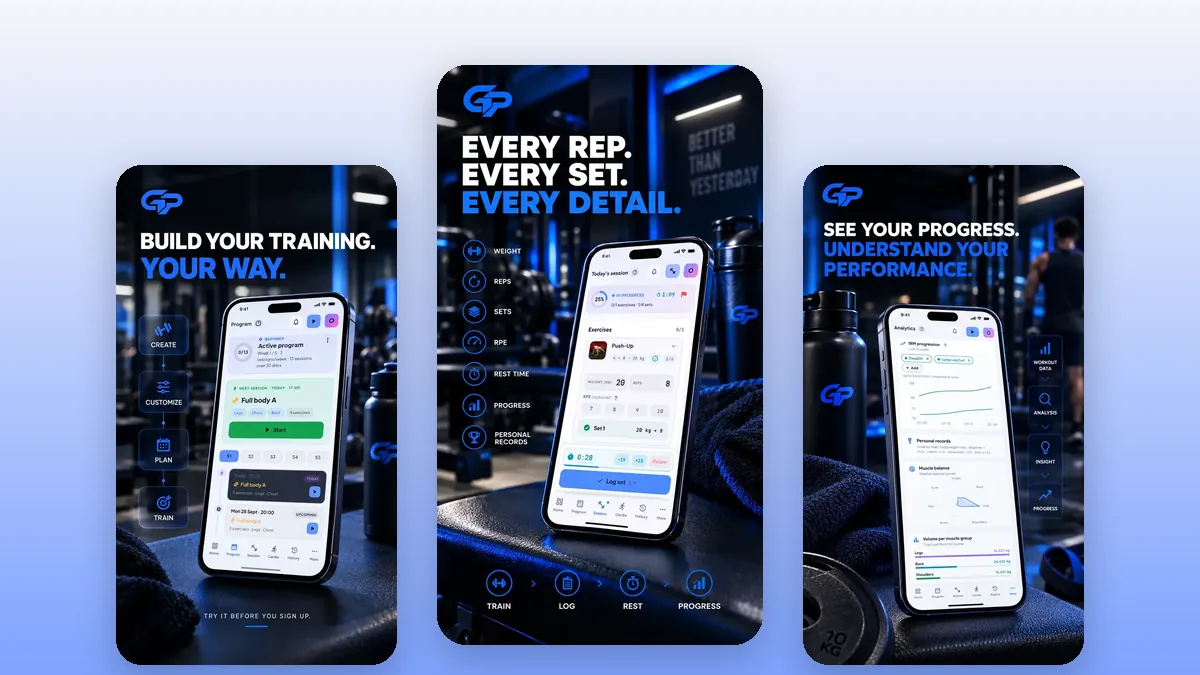
GymProgress vs Strong: if you are on iPhone with an Apple Watch and want the fastest workout log, Strong is an excellent choice. If you are looking for a completely free alternative to Strong, with a 30-day program that manages your progression and an Arabic interface, GymProgress is a better fit, as long as you are on Android or use the browser. Here is the detail, criterion by criterion, so you can choose with full knowledge.
In this guideexpand_more
GymProgress and Strong at a glance
Strong presents itself as a digital training log: its tagline, “Think less. Lift more.”, sums up its promise of replacing the gym notebook with the simplest, cleanest tool possible. The app is available on iPhone, Android and Apple Watch, where you can log a workout without taking out your phone. It has passed one million downloads on Google Play and has a very large number of App Store ratings, which makes it a long-established reference among lifters.
GymProgress is a younger app, free and without a subscription, available on Android and on the web. It combines a workout log, a catalog of more than 600 exercises with detailed guides, a 30-day program generator and an analytics dashboard. Its interface is available in French, English and Arabic, with a right-to-left layout for Arabic.
Both apps share the same core — logging your sets, weights and reps — but not the same philosophy: Strong bets on speed and simplicity, GymProgress on guidance and free access to every feature.
Comparison table
Here are the main differences at the time of writing (October 2026), based on Strong's official website, help center and store listings, and on GymProgress's current features.
| Criterion | GymProgress | Strong |
|---|---|---|
| Model | Free, no paid version | Limited free + paid PRO |
| Workout templates | Unlimited | 3 free, unlimited with PRO |
| Platforms | Android + web (browser) | iPhone, Android, Apple Watch |
| Native iOS app | No (web on iPhone) | Yes |
| Smartwatch | No | Apple Watch, standalone logging |
| Languages | French, English, Arabic | Includes French, no Arabic |
| Generated program | 30 days with progression | A few example templates |
| Supersets | No dedicated supersets | Yes |
| RPE and rest | Optional RPE, rest timer | RPE 6 to 10, rest timer |
| Charts | All included for free | All charts with PRO |
| Measurements and photos | No | Measurements with PRO |
| Data export | JSON | CSV |
Logging during the workout
This is Strong's home turf. You log your sets with weight and reps, can tag a set as warm-up, failure or drop set, and group exercises into supersets. A rest timer starts automatically after each set, and RPE can be recorded on a 6 to 10 scale, with a documented mapping to reps in reserve (RIR). On Apple Watch, logging works standalone: handy if you leave your phone in the locker.
GymProgress covers the essentials: sets with weight, reps and optional RPE, a rest timer, scheduled workouts and reusable workout templates. Each exercise links to a guide with instructions and the muscles worked, and you can swap an exercise for an alternative if a machine is taken. On the other hand, there are no dedicated supersets, no free-form notes per workout and no logging from a watch.
If your top priority is ultra-fast logging, with precise set types and a watch on your wrist, Strong has the edge. If you need guidance in choosing and performing exercises, GymProgress gives you more.
Tracking your progress
Strong records your personal records, estimates your 1RM and calculates total weight lifted. Its charts show volume, 1RM and workouts per week over time, but access to all charts is part of the PRO plan. Body weight can be tracked, with optional sync to Apple Health or Google Fit, while body part measurements are reserved for PRO.
In GymProgress, every analysis is free: personal records and how they evolve, max weight progression week after week, estimated 1RM, weekly volume, volume and set count per muscle group, your RPE distribution, a calendar of training days and body weight tracking. Volume per muscle group is useful to check that you are not neglecting a muscle.
As for limits, GymProgress handles neither progress photos nor body measurements, and it does not connect to any health app. If those matter to you, Strong with PRO is more complete on that front.
Training programs
Strong is first and foremost a log: you create your own workout templates and the app brings them back each time. According to its official help, it only offers a few default example templates, with no program library, and no generated plan or automatic progression is mentioned in its listings or help. That fits its philosophy: you already know what you want to do, and Strong helps you write it down.
GymProgress approaches it from the other side. You enter your level, your goal, where you train (gym, home or bodyweight), how long your workouts last and how many sessions per week, from 2 to 6. The app then generates a 30-day program. Weights are carried over from your last workout and double progression tells you when to go up: first reps within the target range, then weight.
For a beginner, or someone getting back into training without knowing where to start, this structure saves a lot of time. For an experienced lifter already following a written program, the generator matters less.
Pricing and business model
At the time of writing (October 2026), according to its official help and store listings, Strong runs on a freemium model. The free version lets you log unlimited workouts but caps you at 3 workout templates. The Strong PRO subscription unlocks unlimited templates, body measurements, all charts, the plate and warm-up calculators, and themes. It comes as a monthly, six-month, yearly or lifetime option, and the price depends on your country and purchase channel. A nice point: Strong states it has no ads and that your data is never locked.
GymProgress is free, with no subscription and no paid version: unlimited templates, the generated program, analytics and the exercise catalog are all available without paying. The website also offers free calculators (1RM, calories, protein, macros), guides, recipes and food pages.
If you build many different workouts and do not want to pay anything, Strong's 3-template limit can quickly be felt. If a subscription does not bother you for an app you use several times a week, Strong PRO remains a clear option.
Languages and platforms
Strong is available in French, as well as English, German, Spanish, Italian, Portuguese, Russian, Japanese, Korean and Chinese, but not in Arabic. It runs on iPhone, Android and Apple Watch; its App Store listing does not mention iPad, and no Wear OS app or web logging version is confirmed.
GymProgress is available in French, English and Arabic, with a true right-to-left interface. That is one of its distinctive strengths if you train in Arabic or share the app with Arabic-speaking friends and family. It runs on Android through Google Play and in any browser, including on iPhone, where you can install it as a home screen shortcut. There is no native iOS app and no smartwatch app.
In practice: on iPhone with an Apple Watch, Strong fits your hardware better. On Android, or if Arabic matters to you, GymProgress is a better fit. On the data side, GymProgress hosts it in the European Union, lets you export it as JSON and delete your account; Strong offers a CSV export, which cannot be re-imported into Strong.
Which one to choose for your profile?
Choose Strong if you are on iPhone and want to log workouts from your Apple Watch, if you already know exactly what you do at the gym and want the fastest log possible, if you rely heavily on supersets and set types, or if you want to track measurements and photos with a PRO subscription. Its simplicity, the absence of ads and its established reputation are real arguments.
Choose GymProgress if you want a completely free app with no limit on workout templates, if you need a 30-day starting program with progression already set up, if you want detailed per-muscle-group analytics without paying, or if you prefer an Arabic interface. Keep its limits in mind: no native iOS app, no watch, no social features, and a community that is still small.
Nothing stops you from trying both. If you switch from Strong to GymProgress, start by exporting your history as CSV to keep it, then recreate your main workout templates and enter your recent working weights: double progression will take over from your very first sessions.
Strong is a trademark of its respective owners; GymProgress is not affiliated with it.
Frequently asked questions
Is Strong free?expand_more
Partly. At the time of writing (October 2026), according to its official help, Strong's free version allows unlimited workouts but only 3 workout templates. Unlimited templates, body measurements and all charts require the Strong PRO subscription, available monthly, every six months, yearly or lifetime, with a price that varies by country.
Is Strong available in French?expand_more
Yes. Its App Store listing includes French among about ten languages, so you can use Strong in French without any problem.
Is Strong available in Arabic?expand_more
No, Arabic is not among the languages listed by Strong. GymProgress offers a full Arabic interface, right to left.
What is a free alternative to Strong?expand_more
GymProgress is a completely free alternative to Strong: unlimited templates, a 30-day program with progression and full analytics, with no subscription. In return, it has no native iOS app and no watch version.
Can I get my data out of Strong?expand_more
Yes, Strong lets you export your history as a CSV file, which you can keep or open in a spreadsheet. That file cannot be re-imported into Strong. To get started on GymProgress, the simplest way is to recreate your templates and enter your recent weights.
Does GymProgress work on iPhone?expand_more
Yes, through the browser: you can use GymProgress on the web from your iPhone and add it as a home screen shortcut. There is no native iOS app and no Apple Watch app.
Does Strong offer training programs?expand_more
According to its official help, Strong only provides a few example templates, with no program library, and does not mention automatic progression. GymProgress generates a 30-day program tailored to your level, goal and equipment.
Log your workouts in seconds
GymProgress logs your sets, keeps your history, tracks your records and charts your progress — for free, on Android and the web.